What Is DevOps? From Simple Automation to Software Delivery Pipelines
What is DevOps?
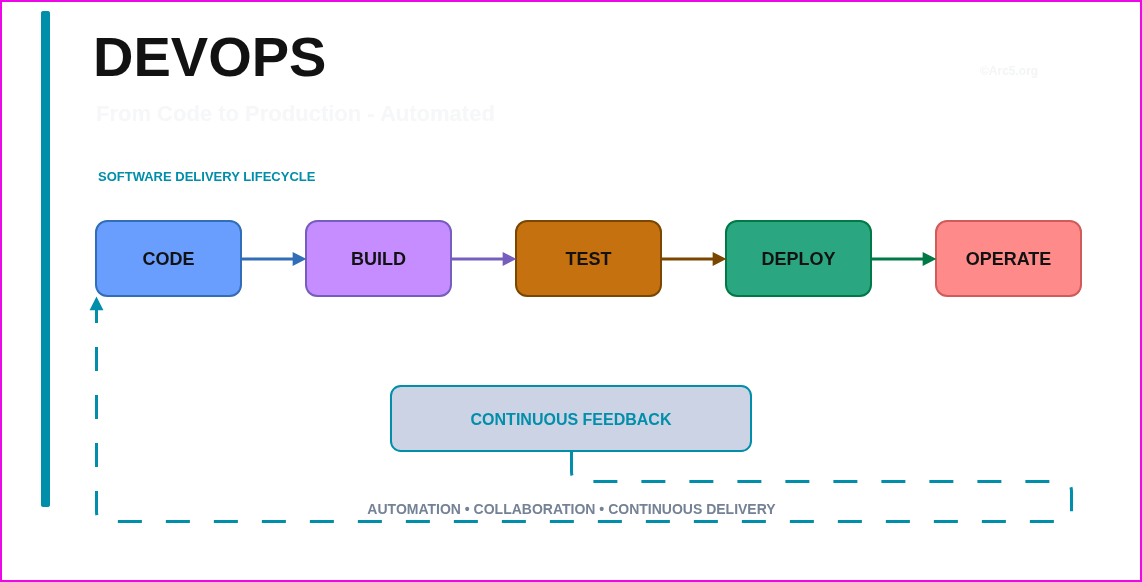
DevOps is a software delivery philosophy and cultural shift that bridges development (Dev) and operations (Ops) to improve collaboration, speed, and quality. In practice, DevOps combines a set of tools and practices (automation, CI/CD, infrastructure-as-code, monitoring, etc...) with a culture of shared responsibility and feedback. The goal is to “accelerate the delivery of high-performance applications and services by combining and automating the work of software development (Dev) and IT operations (Ops)”. Instead of developers “thowing code over the wall” to ops, a DevOps team works as one cross-functional unit with shared goals: to continuously integrate and deliver value with high reliability. The hallmarks of DevOps include Continuous Integration/Continuous Delivery (CI/CD), automation of repetitive tasks, and continuous monitoring for feedback. By integrating testing, security, and deployment into the development pipeline, organizations can release smaller updates more frequently, catch problems earlier, and respond to user needs faster.
“DevOps combines development and operations teams to deliver software faster, more securely, and more efficiently”. It involves an end-to-end lifecycle of planning → code → build → test → release → deploy → operate → monitor, all underpinned by collaboration and automation.
DevOps Principles
Several core principles guide a DevOps approach:
- CI/CD (Continuous Integration & Delivery/Deployment): Developers integrate code changes frequently (CI) and automations run builds and tests immediately. Passing builds are packaged and automatically promoted through test and staging environments (CD), enabling push-button or fully automated deployment to production.
- Infrastructure as Code (IaC): Infrastructure (servers, networks, services) is defined in version-controlled code. IaC ensures environments are reproducible and consistent: “For an environment to be automated, it needs to be consistent… IaC generates the same environment every time, removing unique configurations that can’t be reproduced”. IaC (e.g. Terraform, CloudFormation, Ansible) allows provisioning of test, staging, and prod environments through code.
- Automation & Pipelines: Manual tasks (building, testing, deploying, provisioning) are codified into CI/CD pipelines. Every commit triggers an automated pipeline (usually defined in YAML or similar) that builds artifacts, runs unit/integration tests, performs scans, and upon success publishes deployable packages. Automation reduces human error and frees teams to focus on high-level work.
- Observability & Monitoring: Once deployed, applications and infrastructure are continuously monitored (logs, metrics, traces). DevOps teams use dashboards and alerts to detect issues and optimize performance. The Operate/Monitor phases use “automated observability and management tools to continuously monitor and optimize operations…to make sure that network, storage, platform, compute and security postures are all working properly”. This feedback drives rapid remediation and informs the next development cycle.
- Shift-Left Testing & Security: Testing (unit, integration, security scans) is moved as early as possible in the pipeline. Rather than finding bugs or vulnerabilities only at the end, code quality and security tools (SAST, SCA, linting, secrets scanning) run on every commit or PR. “Shift left security (DevSecOps) embeds security from initial stages of planning, design, and coding through deployment”. This ensures issues are caught early and reduces risk downstream.
- Collaboration & Culture: DevOps demands a culture of shared responsibility. Developers, operations staff, QA testers, and security teams collaborate closely. Communication is open (often via chat ops and integrated dashboards), and teams co-own the reliability of the service. As GitLab notes, “DevOps practices enable software development and operations teams to accelerate delivery through automation, collaboration, fast feedback, and iterative improvement”.
Together, these principles lead to more reliable, frequent releases and a faster response to user needs. The DevOps culture emphasizes hyperfocus on customer needs and “building a culture of accountability, empathy, and joint responsibility”.
DevOps Roles
In a DevOps-driven organization, responsibilities are shared, but several roles often contribute:
- Developers (Dev): Write application and service code. In DevOps they often also write tests (unit, integration), define deployment manifests, and may consume platform services (e.g. APIs from the platform team) to deploy their code.
- Operations/Infrastructure (Ops): Traditionally responsible for deploying and managing production systems. In DevOps they often work closely with developers, building and maintaining the CI/CD platform, environments, and infrastructure. This role includes managing CI/CD servers, cloud infrastructure, networking, and responding to incidents.
- Site Reliability Engineer (SRE): A role (pioneered by Google) focused on reliability, scalability, and automation of operations. SREs apply software engineering to operations problems, build monitoring/alerting, and ensure SLIs/SLOs are met. They often build automation for deployment and handle post-release support. (Some organizations combine SRE duties with platform or ops roles.)
- Platform Engineer (Platform/DevOps Engineer): Builds and maintains an internal developer platform. They create self-service tools (catalogs, pipelines, templates) so that development teams can deploy and manage services without needing to build CI/CD or provisioning from scratch. A platform team abstracts away complexity (cloud accounts, networking, base images) and provides “golden paths” for deployment.
- QA/Test Engineers: Responsible for automated testing, test infrastructure, and ensuring software quality. In DevOps they integrate testing suites into the pipeline (e.g. automated regression, performance, security tests) and may also help define acceptance criteria and test data.
- Security (Sec/DevSecOps): Security engineers integrate security checks (SAST, container scans, IaC scans) into the pipeline and review security risks. They work with dev teams to remediate vulnerabilities and ensure compliance. As Splunk summarizes, key DevOps roles include “security engineer… [working] specialized skills… to ensure high-quality releases”.
- Product/Business Owner: Represents the customer or business perspective, prioritizing features and acceptance criteria. They ensure the team is delivering value and may assist in acceptance testing (especially UAT/pilot).
- Release Engineer (optional): In larger organizations, a role focused on managing releases, coordinating deployments (change management), and tracking versions. Often replaced by automated pipelines and approvals.
Splunk underscores that a DevOps team is multi-skilled and cross-functional. For example, the “platform team” provides self-service infrastructure and CI/CD, while the “business system teams” (product teams) develop and deploy applications on that platform. Clear responsibilities and good communication are crucial. According to Splunk, roles such as DevOps engineer, developer, product owner, QA/testing engineer, security engineer, and SRE “each contribute specialized skills to distinct phases of the pipeline”.
DevOps Toolchain
DevOps relies on a chain of tools that automate and govern each stage of delivery. Common categories include:
| Tool Category | Examples |
|---|---|
| Source Control | Git (GitHub, GitLab, Bitbucket, Azure Repos), Mercurial |
| CI/CD Engines | Jenkins, GitLab CI, GitHub Actions, Azure Pipelines, CircleCI, TeamCity, Travis CI, GitHub Codespaces |
| Artifact Repository | JFrog Artifactory, Sonatype Nexus, Azure Artifacts, GitHub/GitLab Packages, Docker Hub |
| Container Runtime/Orchestration | Docker, containerd, CRI-O, Kubernetes (deployments, pods), OpenShift |
| Configuration/Provisioning | Terraform, AWS CloudFormation, Azure ARM Templates, Pulumi, Ansible, Chef, Puppet, SaltStack |
| Secrets Management | HashiCorp Vault, AWS Secrets Manager, Azure Key Vault, Kubernetes Secrets (sealed-secrets), Bitwarden |
| Monitoring & Observability | Prometheus, Grafana, Datadog, New Relic, Splunk, ELK/EFK (Elasticsearch/Fluentd/Kibana), Grafana Cloud, Nagios, AppDynamics |
| Logging & Tracing | ELK/EFK, Splunk, Loki, AWS CloudWatch Logs, Azure Monitor, Jaeger, OpenTelemetry |
| Policy & Compliance | Open Policy Agent (OPA/Gatekeeper), Kyverno, AWS Config Rules, Azure Policy, Terraform Sentinel, HashiCorp Boundary |
| Container Security Scanning | Snyk, Trivy, Clair, Aqua Security, Twistlock (Prisma) |
| GitOps & Deployment | Argo CD, Flux, Weave GitOps, Jenkins X, Spinnaker, Octopus Deploy, Terraform Cloud/CD |
| ChatOps & Collaboration | Slack/MS Teams, Mattermost, GitHub/GitLab Issues & PRs |
| IDEs/Code Editors | VS Code, IntelliJ, Eclipse, etc. (with DevOps extensions) |
Each tool integrates with others via APIs, webhooks or native integrations. For example, a commit to Git (source control) can automatically trigger a pipeline in Jenkins or GitHub Actions (CI), which builds a container and pushes it to an artifact registry, then Argo CD picks up the new image for deployment to Kubernetes. Security scans (SAST, container scans) and policy checks (infrastructure policy as code) can be injected into the pipeline stages. The goal is to have one coherent, automated delivery pipeline, rather than silos of unrelated tools.
Note: The “right” DevOps toolchain is one with the fewest integration gaps. Rather than a sprawling list of disconnected tools, teams aim for a smaller, well-integrated set (or platform) that provides shared policy and audit logs. For example, GitLab or Azure DevOps can cover source control, CI, and artifact repositories in one suite, or AWS/Azure toolchains can be used end-to-end, but teams often mix best-of-breed tools as needed.
CI/CD Pipeline Anatomy
A pipeline is the automated workflow that builds, tests, and deploys software. It is typically defined as code (in YAML or similar) so that it is version-controlled alongside the application. A minimal CI/CD pipeline might look like:
 1# Example: Generic CI pipeline (e.g. GitHub Actions or GitLab CI)
 2name: CI
 3
 4on:
 5  push:
 6    branches: [ main, development ]
 7  pull_request:
 8    branches: [ main ]
 9
10jobs:
11  Build:
12    runs-on: ubuntu-latest
13    steps:
14      - name: Checkout source
15        uses: actions/checkout@v3
16
17      - name: Set up Node.js (example)
18        uses: actions/setup-node@v3
19        with:
20          node-version: '18'
21
22      - name: Install dependencies
23        run: npm install
24
25      - name: Run tests
26        run: npm test
27
28      - name: Lint code
29        run: npm run lint
30
31      - name: Build project
32        run: npm run build
33
34      - name: Publish artifact
35        uses: actions/upload-artifact@v3
36        with:
37          name: app-build
38          path: build/
39
40  DeployDev:
41    needs: Build
42    if: github.ref == 'refs/heads/main'
43    runs-on: ubuntu-latest
44    steps:
45      - name: Download artifact
46        uses: actions/download-artifact@v3
47        with:
48          name: app-build
49
50      - name: Deploy to Dev (placeholder)
51        run: echo "Deploying to dev environment..."
52
53  # Further stages like DeployUAT, DeployProd would follow similarly.
(Above is an illustrative GitHub Actions YAML snippet. Azure Pipelines YAML or GitLab CI would be similar in concept.)
The pipeline typically has stages such as: Build → Unit Tests → Code Scans (SAST/SCA) → Package (container/image) → Artifact Publish → (sometimes Integration/Functional Tests) → Deploy to Dev → Automated Tests → Promote to UAT/Pilot → Manual Approval → Deploy to Prod. At each stage, automated gates (security scans, quality metrics, approvals) ensure only vetted artifacts move forward.
Branching Strategy
In Git, teams adopt a branching model to manage features and releases. Common strategies include:
- Trunk-Based / GitHub Flow: A single long-lived
main(ormaster) branch, with short-lived feature branches (feature/*). Features are merged via pull requests only after code review and CI passing. This approach minimizes branch divergence. - Git Flow: A
developbranch for ongoing work, amainbranch for releases, plus separate long-livedrelease/*andhotfix/*branches. More complex, often used when strict release cycles are needed. - Release Branching: Teams may create release branches (e.g.
release/1.2.0) when preparing for a production deployment, allowing minor fixes whilemainmoves on.
The essential rule is: protect the main integration branches with branch policies (e.g. require PR reviews, signed commits, passing CI, no direct pushes) so that all changes are vetted. A simple example Git workflow:
 1# Developer starts feature
 2git checkout -b feature/login-feature
 3
 4# Work on code, commit frequently
 5git add .
 6git commit -m "Login feature implemented"
 7
 8# Push to remote and open PR
 9git push origin feature/login-feature
10
11# After PR is reviewed and merged:
12git checkout main
13git pull origin main
Branch protection (in GitHub/GitLab) enforces that main (or develop) cannot be force-pushed; merges require reviews, passing builds, and possibly security gates. This maintains source code integrity.
Infrastructure as Code (IaC) and Configuration
Infrastructure-as-Code is central to DevOps. Systems are provisioned and configured via code scripts. For example, using Terraform to define cloud resources:
 1# Example: Terraform snippet provisioning AWS S3 and EC2
 2provider "aws" {
 3  region = "us-east-1"
 4}
 5
 6resource "aws_s3_bucket" "app_data" {
 7  bucket = "my-app-data-bucket"
 8  acl    = "private"
 9}
10
11resource "aws_instance" "app_server" {
12  ami           = "ami-0c55b159cbfafe1f0"  # example AMI ID
13  instance_type = "t3.micro"
14
15  tags = {
16    Name = "app-server"
17  }
18}
When this Terraform code is committed, a pipeline can run terraform init and terraform apply to create the resources. IaC enables repeatable, versioned infrastructure. Red Hat notes that with IaC, you can “define and manage resources consistently across different environments” and avoid manual setup.
Similarly, Kubernetes manifests or Helm charts are used for deploying containers. A Helm values.yaml might specify an image and replica count:
1# Example: Helm values for a Kubernetes deployment
2image:
3  repository: myregistry/myapp
4  tag: 1.0.0
5replicaCount: 3
6service:
7  type: ClusterIP
8  port: 80
To apply, a pipeline could run helm upgrade --install myapp ./chart -f values.yaml. By treating the cluster state as code, the pipeline fully automates environment setup and application deployment.
Key Point: Use the same IaC deployment process for all environments (Dev, UAT, Prod). This avoids configuration drift. For instance, the same Terraform scripts should create dev vs prod resources with only variable differences (VPCs, instance sizes, etc.). This ensures high fidelity between test and production.
Environment Design & Promotion Model
A mature DevOps pipeline promotes the exact same artifact through multiple environments, each with its own purpose and controls. A typical set is:
- DEV (Development Integration): Early integration environment. Uses synthetic or scrubbed data. Developers and testers can deploy frequently. Security posture is moderate (basic network isolation, standard credentials).
- UAT (User Acceptance Testing): Pre-production environment for business/QA validation. Often holds a snapshot of production data (masked). Tighter controls: only releases from DEV passing automated gates are allowed here.
- PILOT / STAGING: A production-like environment. May mirror prod configuration exactly (same VMs, clusters). Used for final testing (performance, security), and by a subset of end-users or internal testers. Security is very high – often behind extra firewalls or on an isolated network segment.
- PROD (Production): Live environment serving real users. Requires strict change control: approvals, scheduled windows, rollback capabilities. Only fully validated artifacts (from PILOT) are deployed. Production secrets and data are restricted.
These environments are connected by promotion steps, not by rebuilding code. For example, a container image built once is tagged (e.g. myapp:sha256-xyz) and deployed to DEV. After tests, the same tagged image is promoted to UAT, then to PILOT, then to PROD. This “build once, deploy everywhere” model prevents discrepancies between what was tested and what runs live.
The diagram below illustrates a simple flow of artifact promotion across environments. Each environment box is colored distinctly:

In practice, environments are also network-isolated. For example, the Production network is often on a separate VLAN or VPC, and developers cannot directly access it. Administrative access goes through jump hosts or privileged access management (PAM). Data is handled securely: Prod uses encrypted real data, while Dev uses masked or synthetic data. Secrets (credentials, API keys) are stored per-environment (e.g. in a secrets vault with environment namespaces). Access controls (RBAC, IAM) restrict who can deploy to each environment.
A simple table of environment roles might be:
| Environment | Purpose | Data Type | Access Controls |
|---|---|---|---|
| DEV | Developer testing | Dummy/masked data | Open to devs, automated CI/CD |
| UAT | User acceptance | Production-like | Limited to test team, gated CI |
| PILOT | Production validation | Production-like | Very restricted (RBAC, network whitelisting) |
| PROD | Live service | Real production | Strict change control (PAM, 2FA, etc.) |
The key rule is: Build once, promote many. Never rebuild the artifact in each env. The artifact (container image, package) that passed in UAT must be the same one deployed in Prod. This guarantees the software you tested is the one users see.
Pipeline Security and Controls
We distinguish build-time checks from deploy-time gates and runtime protections:
- Build-Time Controls: During the CI build, run static code analysis (SAST), dependency scanning (SCA), license compliance checks, and container/image scanning. For example, tools like SonarQube or Trivy can fail the build if critical issues are found. Also run unit tests and linting. Secrets scanners (e.g. git-secrets, TruffleHog) scan commits and container images. A build pipeline should produce an SBOM (software bill of materials) and sign the artifact.
- Deploy-Time Controls: Before deploying to an environment, verify the artifact’s integrity (e.g. check image digest or signature) and apply environment policies (e.g. “no production deploy unless SAST rating > a threshold”). A manual or automated approval gate often sits between UAT/Pilot and Prod (e.g. a JIRA change request, or an Azure DevOps approval). Also enforce least-privilege: the pipeline’s service account should not have blanket admin rights on production servers. It should call an orchestrator (e.g. Kubernetes, Argo CD, or a deployment API) with limited permissions.
- Runtime Controls: Once running, use firewalls (WAF for web traffic), network segmentation, host hardening, EDR/antivirus, and runtime application monitoring (RASP/CNAPP) to detect anomalies. Ensure logs (application, OS, audit logs) are shipped to a SIEM for analysis. Use secrets rotation and encryption-at-rest/in-transit. Have automatic rollback triggers on health check failures. As Palo Alto notes, security must “meet developers where they are” – security feedback should appear in the developer workflow (e.g. pull requests) and in the runtime monitoring stack.
In summary, security basics in DevOps (“DevSecOps”) means embedding checks in the pipeline, plus maintaining a hardened production environment. A short mnemonic: Build – Sign – Scan – Gate – Monitor.
Release Strategies
How you upgrade production can further reduce risk:
- Rolling Deployment: Gradually replace old instances with new ones. For example, in a Kubernetes Deployment you update the image and pods are replaced one by one. Traffic is shifted to new pods automatically. This ensures no downtime and quick rollback (old pods remain until new ones are ready).
- Blue/Green Deployment: Maintain two identical environments (blue and green). One (blue) is live, the other (green) is idle. Deploy the new version to green, run final tests, then switch router/load-balancer traffic from blue to green. If issues occur, switch back immediately. This provides instant rollback and zero-downtime (if sessions are handled correctly).
- Canary Deployment: Release the new version to a small subset of users first. For example, 5% of traffic goes to v2 (new version) and 95% to v1. Monitor metrics; if stable, increase to 25%, 50%, then 100%. Tools like Istio or Linkerd can route a percentage of requests. Canary requires telemetry: automated analysis of errors or performance determines promotion or rollback.
- Feature Flags / Toggle: Not a deployment per se, but a release management technique. Deploy code to production with features disabled behind flags. Enable flags for subsets of users or ramp up gradually. This allows merging code at any time without exposing incomplete features.
Below is a simple Mermaid chart illustrating a blue/green switch:
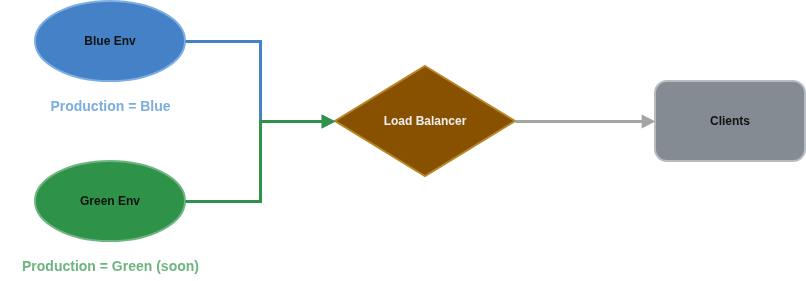
Ultimately, DevOps teams choose strategies based on their risk tolerance. The common theme is observability: metrics and logs determine if a release is healthy. Gate automation (in CI/CD) can even evaluate canary test results before proceeding, making the promotion fully automated if configured.
Common Commands and Workflow Snippets
For concreteness, here are some common commands you might see in a DevOps workflow:
- Git Workflow:
1git clone git@github.com:org/app.git 2git checkout -b feature/user-auth 3# ... make changes ... 4git add . 5git commit -m "Add user authentication" 6git push origin feature/user-auth 7# Create a PR against main, get it reviewed, then merge. 8# After merge: 9git checkout main 10git pull origin main - Docker Build & Push:
1docker build -t myregistry/myapp:1.0.0 . 2docker push myregistry/myapp:1.0.0 - Terraform Init/Apply:
1cd infra/terraform 2terraform init 3terraform plan -out=tfplan 4terraform apply -auto-approve tfplan - Helm/Kubectl Deploy:
1# Using Helm 2helm upgrade --install myapp ./chart --namespace dev --set image.tag=1.0.0 3# Or raw kubectl 4kubectl apply -f k8s/deployment.yaml --namespace dev 5# Syncing a GitOps repo with Argo CD 6argocd app sync myapp - Branching Example:
1# Trunk-based example
2git checkout main
3git pull origin main
4git checkout -b feature/add-payment
5# ... work ...
6git merge main  # keep up-to-date
7git push
8# Create PR from feature/* into main
Each of these is often run automatically by the CI/CD pipeline instead of manually. For instance, the pipeline YAML would contain the equivalent of docker build/push and kubectl apply steps, triggered by code merges.
Recommended Next Steps and Reading:
- Review the State of DevOps reports (e.g. Puppet’s or DORA’s) for industry trends and metrics.
- Study Continuous Delivery (CD) seminal literature by Jez Humble and Dave Farley, which covers many DevOps foundations.
- Explore specific tool documentation for platforms you use: e.g. Azure DevOps Labs, AWS DevOps docs, or Google Cloud SRE guides.
- Read about DevSecOps practices (e.g. OWASP DevSecOps guidelines, NIST DevOps).
- Practice by building a small project’s pipeline end-to-end: start with a simple “Hello World” app, and add stages (build, test, scan, deploy to a Kubernetes cluster).
By combining these principles, roles, and tools into an integrated pipeline, organizations can deliver software rapidly and securely. The payoff is faster innovation, higher quality releases, and robust production systems that can evolve with business needs.